 AutoPTT
Simulating hardware keyboard input on Windows
WARNING: This is post is rather technical, so if that’s not your thing, thank you and good bye!
AutoPTT 4.0.0 was recently released with support for FakerInput, a driver that shows up as a keyboard and mouse that can be controlled by software.
Being able to simulate input has always been core to AutoPTT (after all, the name comes from Automatic Push-to-Talk) so it made sense to ensure maximum compatibility with games and apps, and FakerInput helps with that goal.
Normally, AutoPTT uses SendInput to simulate input. The trouble with this is that input generated in this way can easily be detected and subsequently ignored, with either a low level keyboard/mouse hook or a raw input hook.
A low level keyboard hook is given a KBDLLHOOKSTRUCT that looks like this:
typedef struct tagKBDLLHOOKSTRUCT {
  DWORD     vkCode;
  DWORD     scanCode;
  DWORD     flags;
  DWORD     time;
  ULONG_PTR dwExtraInfo;
} KBDLLHOOKSTRUCT, *LPKBDLLHOOKSTRUCT, *PKBDLLHOOKSTRUCT;
The flags property is a bitmask that may include LLKHF_INJECTED which indicates that the input came from SendInput.
However, it is highly unlikely for a game to use low level hooks for input due to performance concerns, so instead they either simply query key states with functions like GetKeyState, GetAsyncKeyState and GetKeyboardState, or use Raw Input. (And I really hope they use buffered raw input… because if they don’t, they can completely miss input events, which is obviously very bad.)
Raw input looks like this:
typedef struct tagRAWINPUT {
  RAWINPUTHEADER header;
  union {
    RAWMOUSE    mouse;
    RAWKEYBOARD keyboard;
    RAWHID      hid;
  } data;
} RAWINPUT, *PRAWINPUT, *LPRAWINPUT;
What we’re interested in is the header property, which looks like this:
typedef struct tagRAWINPUTHEADER {
  DWORD  dwType;
  DWORD  dwSize;
  HANDLE hDevice;
  WPARAM wParam;
} RAWINPUTHEADER, *PRAWINPUTHEADER, *LPRAWINPUTHEADER;
The hDevice property indicates the device from which the input is coming from and (based on my experience) it is 0 for input generated with SendInput.
The fact that input from SendInput is easily detected isn’t a problem in the vast majority of games but there are a handful that choose to completely ignore it.
Once the issue was originally brought to my attention, I spent a few days building the AutoPTT Sidekick as a means to get around it. The Sidekick is a USB device that shows up as a physical keyboard and a communications device, the latter of which can be used to press/release keys on the keyboard. So it’s essentially the same thing as FakerInput, except that it requires physical hardware (a cheap microcontroller) and some tech-savviness on the user’s part, whereas FakerInput is just a simple driver that anyone with half a brain can just install.
I likely wouldn’t have built the Sidekick if I’d known about FakerInput back then, but hey, better late than never, huh?
While I don’t have any stats to back this, I would hazard a guess that not many people used the Sidekick. Because if they did, I would expect to have received bug reports, because as I worked on FakerInput, it turned out that there were a few slight issues with the current implementation…
But of course, before I found out about that, there were some other challenges. Like the fact that I couldn’t find any documentation for FakerInput aside from the driver code itself. Which, to be fair, would probably have been plenty for someone familiar with that kind of driver, but that was definitely not me.
If anything, my prior knowledge of drivers may even have hurt me a little. I wrote one years ago, and communication with it was with CreateFile followed by DeviceIoControl calls. So I assumed the same would apply here.
I was 50% right. The FakerInput device (like my earlier driver, and the Sidekick), is also opened with CreateFile.
HANDLE h = CreateFileW(
    "\\path\\to\\device",
    GENERIC_READ | GENERIC_WRITE,
    FILE_SHARE_READ | FILE_SHARE_WRITE,
    NULL,
    OPEN_EXISTING,
    0,
    NULL
);
It took me a while to figure this out though because finding the correct device ended up taking a bit more time than I expected. You see, FakerInput exposes a parent device and several child devices, and I kept trying to open a connection to the parent device.
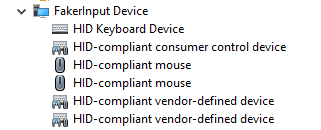
The actual device I needed to connect to was one of vendor-defined child devices.
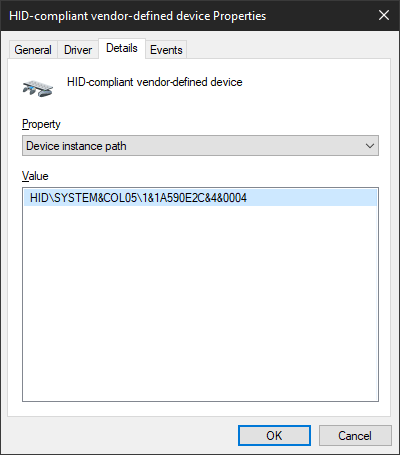
Using that device’s instance path, I was finally able to open a connection.
I would of course have to figure out how to get this information programmatically later, but this was good enough to move forward for now. Time to write some commands… with DeviceIoControl, obviously!
Except I wasn’t sure what IOCTL to write. I assumed IOCTL_HID_SET_OUTPUT_REPORT but it wasn’t even defined anywhere in the SDK.
This MSDN article explains why: it’s only usable from kernel mode, and user mode should go through either WriteFile or HidD_SetOutputReport.
Oh, WriteFile? Imagine that! I already used it for the Sidekick! Now… what to write, though?
Well, fakerinputcommon.h from the driver code had this:
#define REPORTID_KEYBOARD 0x01
#define KBD_KEY_CODES 6

typedef struct _FAKERINPUT_KEYBOARD_REPORT
{
    BYTE      ReportID;
    BYTE      ShiftKeyFlags;
    BYTE      Reserved;
    BYTE      KeyCodes[KBD_KEY_CODES];
} FakerInputKeyboardReport;
So obviously, that’s what I tried first. And as you might expect, it didn’t work. There was another clue in the file though
#define CONTROL_REPORT_SIZE 0x41
So I padded the write data with some zeroes at the end to make it that size, and… nope.
Turns out, that struct needed to be preceded by an additional two bytes of data, where the first was REPORTID_CONTROL (also found in the header file), and the second would be the size of FakerInputKeyboardReport. The final code looks like this:
static void faker_write(uint8_t modifiers, uint8_t const keys[6]) {
  assert(self.device.type == KEYS_DEVICE_faker);
  assert(self.device.faker.handle != INVALID_HANDLE_VALUE);

  FakerInputKeyboardReport report = {
    .ReportID = REPORTID_KEYBOARD,
    .ShiftKeyFlags = modifiers,
  };
  memcpy(&report.KeyCodes, keys, 6);

  uint8_t data[CONTROL_REPORT_SIZE];
  memset(data, 0, sizeof(data));

  data[0] = REPORTID_CONTROL;
  data[1] = sizeof(report);
  memcpy(data + 2, &report, sizeof(report));

  DWORD bytes_written = 0;
  BOOL ok = WriteFile(
    self.device.faker.handle, data, sizeof(data), &bytes_written, NULL
  );

  if (not ok) {
    w_log_line("WriteFile failed, code %lu", GetLastError());
  }
}
This is very similar to how I communicate with the Sidekick:
static void sidekick_write(uint8_t modifiers, uint8_t const keys[6]) {
  assert(self.device.type == KEYS_DEVICE_sidekick);
  assert(self.device.sidekick.handle != INVALID_HANDLE_VALUE);

  uint8_t data[8] = {
    SIDEKICK_ACTION_set_keyboard_state,
    modifiers,
  };
  memcpy(&data[2], keys, 6);

  DWORD bytes_written = 0;
  BOOL ok = WriteFile(
    self.device.sidekick.handle, data, sizeof(data), &bytes_written, NULL
  );

  if (not ok) {
    w_log_line("WriteFile failed, code %lu", GetLastError());
  }
}
So finally, at long last, my first write command succeeded, and a single a appeared in my terminal window. It was then followed by another.
And another.
And many, many more.
The a key was now stuck in the “down” state, and I couldn’t just release the key on the keyboard because, well, it wasn’t a physical keyboard! It wasn’t even a USB device like the Sidekick that you could just unplug. It was just a driver.
I couldn’t type anything either because it would just get contaminated with a bunch of as, and I would really have preferred not to just reboot because I had some unsaved files open.
Thankfully, hitting CTRL-C on the terminal running the test app did the trick. I’m assuming that the driver reset the keyboard to the default state once the handle returned from CreateFile was closed.
Phew, crisis averted.
Now that I had the basics down, it was time to figure out how to programmatically identify the FakerInput device. Which basically came down to looping through devices with SetupDiEnumDeviceInterfaces and looking for ones that had SPDRP_HARDWAREID with the value of FakerInput and could be opened with CreateFile (the path to open you could get with SetupDiGetDeviceInterfaceDetail).
That by itself should probably have done it, but just to be safe, I also checked that the PID/VID (from HidD_GetAttributes) were FAKERINPUT_PID/FAKERINPUT_VID (defined in FakerInput/Device.h), and then also that the Usage and UsagePage fields from HIDP_CAPS (from HidP_GetCaps) were 0x0001 and 0xff00 (which I got from testing; I didn’t look further into what they actually meant).
Getting FakerInput integrated to the main AutoPTT app was not that big of a deal. It was very similar to the Sidekick, after all. Easy peasy.
Haha. Yeah, right. This is where we get to the “slight issues” with the current Sidekick (and thus, FakerInput) implementation, as some time after the initial Sidekick support was added, I had made changes to how the mic activates from keypresses. Specifically, it was now possible for a physical key press to trigger its associated PTT key, even in modes like Voice Activation (ie. if my PTT key was X, I could still press X to activate the mic manually).
See the problem? As far as the system was concerned, FakerInput and Sidekick were physical keyboards. So once a PTT key was activated, whether by pressing the key or by the sound level going over the activation threshold, it would then stay active forever.
Okay, so the obvious thing to do was be to treat the input from Faker/Sidekick as virtual instead of physical. For which I’d need to identify the device that generated the input, and that meant looking at the hDevice property in the raw input header.
Which, of course, was not available to AutoPTT since it didn’t use raw input due to the fact that only low level keyboard/mouse hooks were able to block input (like a key release in the Tap activation mode) from reaching the rest of the system.
I was already quite familiar with raw input from my other app, MoreAccel (check it out if being able to fine-tune mouse sensitivity on a per-game basis sounds useful), so I quickly wrote a small test program that registered both low level hooks and raw input, and it seemed to work great, so I ported that over to the main app, and it worked like a charm.
Just kidding!
It seemed that whenever I enabled raw input, the low level keyboard and mouse hooks stopped running entirely. But they worked fine together in the test program, so what the fuck?
In AutoPTT, the low level hooks run in a separate, high priority thread, and for simplicity, I had spawned another thread for the raw input. And obviously, the GUI itself was also running in a different thread. Maybe that was the problem?
I moved the raw input hook into the same thread as the low level hooks. Didn’t help. But I noticed that actually, the low level hooks did in fact run… but only when the GUI was not the active window. The same thing happened whether the hooks were in different threads or not.
Okay… so what if I moved everything to the GUI thread? (Yes, I know that’s bad practice. Whatever.)
I did that, and when I ran the app, my keyboard and mouse – especially the mouse – became sluggish. Which made sense because the GUI thread’s FPS was capped to save CPU/GPU time, and that meant the low level input hooks were being processed very slowly.
Remember when I said that people wouldn’t generally reach for low level input hooks due to performance reasons? Well, this is why. If they’re not processed ASAP, things get sluggish. You don’t want that, especially in a game.
Now, If I’d just spent a moment to look at the big picture here, I would just have disabled the mouse hook temporarily while I tested out whether putting the hooks into the GUI thread actually solved the problem.
But no, I basically forgot about it, and went straight to fixing the sluggishness instead. I suppose there may have been some sluggishness in my brain at the time, as well.
The obvious solution was to decouple input processing from rendering, so I did just that, and the sluggishness disappeared.
Just one problem: now the GUI was unresponsive!
It turns out, the GUI library AutoPTT uses, Nuklear, expects any input processing to be followed by rendering, like this (AutoPTT renders with DX11):
static void process_input_and_render(void) {
  nk_input_begin(self.nk_ctx);

  MSG msg;
  while (PeekMessageW(&msg, NULL, 0, 0, PM_REMOVE)) {
    TranslateMessage(msg);
    DispatchMessageW(msg);
  }

  nk_input_end(self.nk_ctx);

  if (nk_begin(self.nk_ctx, "main_window", self.main_window_rect, 0)) {
    // create some text, buttons, etc here
  }
  nk_end();

  ID3D11DeviceContext_ClearRenderTargetView(self.context, self.rt_view, &gui_bg.r);
  ID3D11DeviceContext_OMSetRenderTargets(self.context, 1, &self.rt_view, NULL);
  nk_d3d11_render(self.context, NK_ANTI_ALIASING_ON);
  IDXGISwapChain_Present(self.swap_chain, 1, 0);
}
I figured I could just buffer the input and feed it back into Nuklear before rendering. Which actually did work like a charm!
But you know what didn’t work? The low level input hooks. They still weren’t being run when the GUI was the active window. Oops. Should really have tested that before I got sidetracked by the input processing & rendering issue…
It looked like the only option was to spawn a separate process for raw input, and then communicate the required information back to the main process. And as I am someone who values performance, I wanted the IPC to be as fast and efficient as possible.
I use ZeroMQ in AutoPTT quite heavily, and while it works great within the same process using the inproc transport (which is just some memory and a few atomics), the only available ZeroMQ transport between other processes (on Windows) was a TCP socket, and let’s just say fast and efficient are generally not words that I would associate with TCP.
I looked around for some other solutions. I didn’t find anything satisfactory. I could probably have used Windows named pipes though, but I was kind of itching to make something myself, and a lock-free shared memory ringbuffer sounded pretty good, so… that’s what I made. And to avoid busy-waiting on data, I used a named event object on top of that.
Was this detour unnecessary? Probably. Do I care? No, because I like programming.
This is how it looks for the child process:
static void set_raw_key_state_keyboard(
    HANDLE handle,
    uint16_t scan_code,
    uint16_t vk_code,
    bool is_down) {
  struct raw_input_child_msg_s msg = {
    .type = RAW_INPUT_CHILD_MSG_keyboard_state_changed,
    .keyboard_state_changed = {
      .handle = handle,
      .scan_code = scan_code,
      .vk_code = vk_code,
      .is_down = is_down,
    }
  };

  shm_spsc_producer_write(self.producer, &msg, sizeof(msg));

  // This leads to a SetEvent call. It's just not done here because this function can
  // be called several times in a loop, so we just set a flag here and call SetEvent
  // once the loop exits.
  self.should_signal_producer = true;
}
And this is how it looks for the parent:
static void loop(void) {
  for (;;) {
    HANDLE handles[] = {
      self.terminate_signal,
      self.ric.consumer_event,
      self.ric.pi.hProcess,
    };

    DWORD flags = QS_ALLINPUT | QS_ALLPOSTMESSAGE;
    DWORD rc = MsgWaitForMultipleObjectsEx(
      w_array_size(handles), handles, INFINITE, flags, MWMO_INPUTAVAILABLE
    );

    if (rc == WAIT_OBJECT_0) {
      w_log_line("got terminate signal");
      break;
    }

    else if (rc == (WAIT_OBJECT_0 + 1)) {
      on_consumer_readable();
    }

    else if (rc == (WAIT_OBJECT_0 + 2)) {
      w_log_line("WARN: raw input process crashed --> restart");

      ric_deinit();
      ric_init();
    }

    else if (rc == (WAIT_OBJECT_0 + 3)) {
      MSG msg;

      while (PeekMessageW(&msg, NULL, 0, 0, PM_REMOVE)) {
        on_msg(&msg);
      }
    }

    else {
      w_log_assert(0, "MsgWaitForMultipleObjects code %#lx", rc);
    }
  }

  w_log_line("exiting");
}

static void on_consumer_readable(void) {
  static struct raw_input_child_msg_s msg[64];

  for (;;) {
    int_fast32_t count = shm_spsc_consumer_read_items(
        self.ric.consumer,
        &msg,
        w_array_size(msg),
        sizeof(*msg));

    if (count <= 0) {
      return;
    }

    for (int_fast32_t i = 0; i < count; i++) {
      on_consumer_msg(&msg[i]);
    }
  }
}

static void on_consumer_msg(struct raw_input_child_msg_s const *msg) {
  switch (msg->type) {
    case RAW_INPUT_CHILD_MSG_keyboard_state_changed: {
      set_raw_key_state(
        msg->keyboard_state_changed.handle,
        msg->keyboard_state_changed.vk_code,
        msg->keyboard_state_changed.is_down
      );

      break;
    }

    // ...

    default: break;
  }
}
Alright, so I was now successfully keeping track of key states per device (using the device handle, hDevice, as the identifier). There was still the matter of matching the devices with FakerInput, though.
static void dump_raw_input_devices(void) {
  UINT count = 0;
  GetRawInputDeviceList(NULL, &count, sizeof(RAWINPUTDEVICELIST));

  RAWINPUTDEVICELIST *devices =
      (RAWINPUTDEVICELIST*)malloc(sizeof(RAWINPUTDEVICELIST) * count);

  GetRawInputDeviceList(devices, &count, sizeof(RAWINPUTDEVICELIST));

  for (size_t i = 0; i < count; i++) {
    w_log_line("device %zu", i);

    wchar_t name[2048] = { 0 };
    UINT size = 0;

    GetRawInputDeviceInfoW(
      devices[i].hDevice,
      RIDI_DEVICENAME,
      NULL,
      &size
    );

    assert(size < w_array_size(name));

    GetRawInputDeviceInfoW(
      devices[i].hDevice,
      RIDI_DEVICENAME,
      name,
      &size
    );

    if (devices[i].dwType == RIM_TYPEKEYBOARD) {
      w_log_line("  type: keyboard");
    }

    else if (devices[i].dwType == RIM_TYPEMOUSE) {
      w_log_line("  type: mouse");
    }

    else {
      continue;
    }

    w_log_line("  handle: %p", devices[i].hDevice);
    w_log_line("  name: %ls", name);
  }
}
Using that to dump all the raw input devices resulted in output like this
device 0
 type: keyboard
 handle: FFFFFFFF855E3BC5
 name: \\?\HID#VID_0F39&PID_0617&MI_00#7&3b3b9a84&0&0000#{884b96c3-56ef-11d1-bc8c-00a0c91405dd}
device 1
 type: mouse
 handle: 00000000198E4475
 name: \\?\HID#SYSTEM&Col04#1&1a590e2c&4&0003#{378de44c-56ef-11d1-bc8c-00a0c91405dd}
device 2
 type: mouse
 handle: 00000000150328CB
 name: \\?\HID#SYSTEM&Col03#1&1a590e2c&4&0002#{378de44c-56ef-11d1-bc8c-00a0c91405dd}
device 3
 type: keyboard
 handle: 0000000060FF3A05
 name: \\?\HID#SYSTEM&Col01#1&1a590e2c&4&0000#{884b96c3-56ef-11d1-bc8c-00a0c91405dd}
Device 0 is a real device. The others are from FakerInput. The device instance path I was controlling FakerInput from, on the other hand, was \\?\hid#system&col05#1&1a590e2c&4&0004#{4d1e55b2-f16f-11cf-88cb-001111000030}. While it does look to be in a similar format to the raw input device names from above, it’s not quite the same.
But there is a common identifier in there. I’m not sure what it means (if you do, let me know, especially if you think it’s not a reliable way to match the devices), but it seemed consistent, so I decided to use that.
Splitting the strings by # gets us the following:
| Keyboard | Control Device |
|---|---|
\\?\HID |
\\?\hid |
SYSTEM&Col01 |
system&col05 |
1&1a590e2c&4&0000 |
1&1a590e2c&4&0004 |
{884b96c3-56ef-11d1-bc8c-00a0c91405dd} |
{4d1e55b2-f16f-11cf-88cb-001111000030} |
The third item in there looks good, except for what’s after the last &, so if we just leave that out, we get the common part 1&1a590e2c&4.
So that’s what I used to match the raw input devices to the FakerInput control device.
bool faker_path_matches_raw_input_device(
    wchar_t const *faker_path,
    wchar_t const *raw_input_device) {
  wchar_t id_faker[1024];
  wchar_t id_ri[1024];

  size_t len_faker = extract_id(id_faker, w_array_size(id_faker), faker_path);

  if (len_faker == 0) {
    return false;
  }

  size_t len_ri = extract_id(id_ri, w_array_size(id_ri), raw_input_device);

  if (len_ri == 0) {
    return false;
  }

  return len_faker == len_ri
     and wcscmp(id_faker, id_ri) == 0;
}

static size_t extract_id(wchar_t *dst, size_t dst_size, wchar_t const *src) {
  wchar_t const *p2 = wcschr(src, L'#');
  if (p2 == NULL) { return 0; }
  p2 += 1; // skip #

  wchar_t const *p3 = wcschr(p2, L'#');
  if (p3 == NULL) { return 0; }
  p3 += 1; // skip #

  wchar_t const *p4 = wcschr(p3, L'#');
  if (p4 == NULL) { return 0; }

  size_t len = p4 - p3;
  assert(len < dst_size);

  wcsncpy(dst, p3, len);
  dst[len] = 0;

  // dst: "1&1a590e2c&4&0000#"

  p4 = wcsrchr(dst, L'&');
  if (p4 == NULL) { return 0; };

  len = p4 - dst;
  dst[len] = 0;

  // dst: "1&1a590e2c&4"

  return len;
}
I could now tell whether the raw input came from a FakerInput device or not, and it would have been really convenient if a raw input event was always followed by the corresponding low level input event so I could simply combine the two to determine whether to treat the input as physical or not… but of course that was not the case. The order of events was quite inconsistent, and even if it wasn’t, the IPC would likely have made it so anyway.
Remember, the problem was that that in the Voice Activity and Tap modes, using FakerInput (or Sidekick) would make the PTT key stay in the active (down) state because it kept triggering itself, and in the low level input hooks, I needed to block the events that caused it.
But due to the inconsistent order of events, I still couldn’t just use the current raw input state to make any decisions.
Fortunately, I didn’t have to. After some trial and error, it occurred to me that in the Voice Activity and Tap modes, I could just do the following:
static LRESULT keyboard_hook(int code, WPARAM w_param, LPARAM l_param) {
 // ...

  switch (settings->activation_mode) {
    case AUTOPTT_ACTIVATION_MODE_AUTOMATIC: // This is the Voice Activity mode
    case AUTOPTT_ACTIVATION_MODE_TAP_PTT: {
      if (is_key_release and is_part_of_active_ptt_key(vk_code)) {
        block_event = true;
        release_key_for_all_raw_input_devices(vk_code);
      }

      break;
    }

    // ...
  }

  return (block_event)
    ? 1
    : CallNextHookEx(0, code, w_param, l_param);
}
Where is_part_of_active_ptt_key basically just checks the current raw input key state across all physical keyboards (not FakerInput).
This works because when a key on a physical keyboard is held down, the keyboard keeps sending repeated key down events. For example, if my PTT key was X, and I pressed and released it in the Voice Activity mode, with that code, something similar to this would happen:
- I press X on the keyboard
- System generates Raw & LL events for X down (on the physical keyboard)
- AutoPTT sets X down on the FakerInput keyboard
- System generates Raw & LL events for X down (on both physical and FakerInput keyboards)
- I release X on the keyboard
- System generates Raw & LL event for X up (on the physical keyboard). The low level hook blocks the event. System still thinks X is down, but AutoPTT marks it as “up” on all keyboards.
- System generates Raw & LL events for X down (on FakerInput)
- System does NOT generate further events for X on the physical keyboard, so its state remains “up”
- AutoPTT notices that the physical X is up, and releases the key on the FakerInput keyboard as well
- System generates Raw & LL events for X up (on FakerInput). They aren’t blocked because AutoPTT knows the key is not active anymore.
And that’s all folks! Everything worked out great in the end :)
FakerInput support was released with AutoPTT 4.0.0. While it looks like just a feature release which shouldn’t constitute a major version bump, it still included breaking changes where I removed the use_sidekick global setting and added a new profile-specific input_method setting instead, with the options of
enum InputMethod {
  VIRTUAL = 0;
  FAKER = 1;
  SIDEKICK = 2;
}
And since you can access the settings via the public IPC, a breaking change in the settings is a breaking change in the public interface, and therefore a major version bump.
Perhaps in the future I might just deprecate the setting instead, and if anyone were to every use it, just silently migrate it to the new version. That way I could avoid having to bump the settings, IPC, and major app version, which means I wouldn’t need to update both the Stream Deck and Bitfocus Companion plugins as well. Especially when the update basically consists of a few simple lines of code but I still have to publish a new version and wait for it to be approved (during which time the plugin would not work with AutoPTT at all, which means that to be extra safe, I would have to wait with releasing a new version of AutoPTT until after the plugin is approved).
I suppose another way to get around the publish-approval delay would be to have some sort of hosted compatibility.json file that the Stream Deck and Bitfocus Companion plugins could just check occasionally, and if it said that a newer version of AutoPTT was supported with no required code changes, that would be that. No new plugin releases necessary.
However, I am not sure whether this would be considered an acceptable solution. It sounds fine to me though; AutoPTT does not exactly have as large an impact as Crowdstrike or Cloudflare, even if this approach does kind of remind me of some recent incidents…